One of the key challenges in running a business is losing customers for various reasons. To achieve success, it’s essential to analyse these reasons and take proactive steps to re-engage lost customers, turning them into valuable leads that contribute to business growth.
Odoo’s Marketing Automation app simplifies this process by allowing businesses to create targeted activities based on past customer interactions. This ensures seamless automation, enabling you to focus on critical areas that need attention.
Example: Re-Engaging Lost Subscription Customers
Let’s consider a scenario where we want to reach out to customers who cancelled their subscriptions due to high pricing. We’ll walk through the workflow to automate this process:
1. Create a New Marketing Automation Campaign
- Open the Marketing Automation app and click New to create a campaign.
- A menu will appear with multiple options, including pre-built templates. In this case, we’ll create a campaign from scratch.
- Select “Start from Scratch”, name the campaign “Lost Leads”, and set the following:
- Target: Sales Orders (to identify subscription-related sales orders).
- Filter: Find closed subscriptions where customers cited high costs as the reason for cancellation.
2. Send Discount Offers to Lost Customers
- Click “Add New Activity” to define an automated action.
- Choose Email as the activity type.
- Select an email template offering an exclusive discount and set the trigger to activate when the filter conditions are met.
- Save the process.
3. Automate Follow-Up Actions Based on Customer Response
- Once the campaign is active, Odoo provides a graphical view of campaign performance.
- If a customer opens the email, we want to:
- Change the sales order status back to Quotation.
- Update the subscription status to Renewal Quotation.
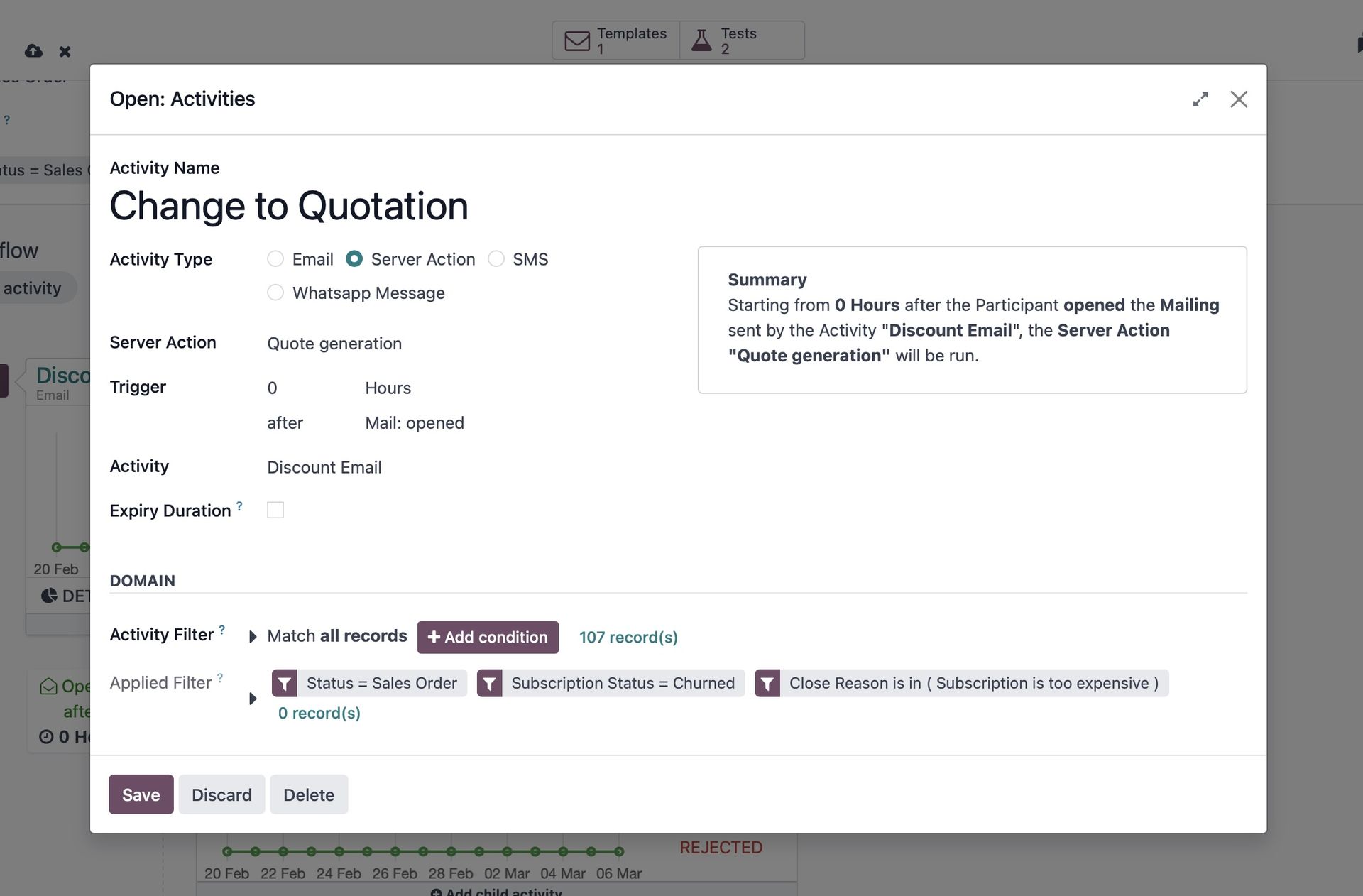
- To do this, click “Add Child Activity” under the graph view. Hovering over the button provides shortcut options.
- Select “Create from Scratch” and choose Server Action as the activity type.
- Configure the trigger to activate when the customer opens the email and update the necessary statuses.
- Save the process to finalize the automation.
- Can save this filter for future use as well.
4. Test Before Launching the Campaign
Odoo allows you to run a demo before making the campaign live:
- Click “Launch a Demo” at the top of the campaign setup page.
- Enter a sample Sales Order with a churned subscription.
- The system will display a step-by-step breakdown of the activities running and upcoming triggers.
Odoo’s Marketing Automation app provides several advantages for businesses looking to streamline their marketing efforts. Here are some key benefits:
· Automated Campaign Management: Set up marketing workflows that automatically trigger emails, SMS, or other actions based on user behaviour. Reduce manual effort and ensure timely engagement with leads and customers.
· Multi-Channel Marketing: Supports email marketing, SMS campaigns, push notifications, and social media actions to engage customers through different channels.
· Lead Nurturing & Customer Retention: Automate personalized follow-ups based on customer interactions, increasing conversion rates. Create drip campaigns to nurture leads and guide them through the sales funnel.
· Segmentation & Targeting: Define custom audience segments based on demographics, behaviours, or previous interactions. Ensure messages reach the right people at the right time.
· Visual Workflow Builder: Drag-and-drop interface to easily design and customize marketing workflows without technical knowledge. Allows businesses to automate complex customer journeys.
· Integration with Odoo Apps: Seamlessly integrates with CRM, Sales, Website, and E-commerce apps for a unified marketing approach. Automatically syncs leads, contacts, and campaign data across different modules.
· Performance Tracking & Analytics: Real-time tracking of campaign metrics like open rates, click-through rates, and conversions. A/B testing to optimize campaign performance.
· Cost-Effective & Scalable: No need for third-party marketing automation tools; everything is integrated within Odoo. Suitable for businesses of all sizes, from startups to enterprises.
With Odoo, recovering lost leads and converting them into valuable opportunities becomes effortless and tailored to your needs.
Enjoying this Odoo Power Tips series? Talk to one of our experts at Empowerion (Odoo Partner in Melbourne) and let us show you how using Odoo can help in re-gaining the lost customers!